Block RDP Files with Redirect Location
Malicious RDP files establish unauthorized remote connections that expose victim's local drives, clipboard, and authentication credentials to attacker-controlled servers. Once executed, these weaponized RDP configurations enable attackers to exfiltrate sensitive data, install persistent malware, and harvest credentials. This sophisticated attack vector bypasses traditional security controls by using signed certificates and legitimate RDP functionality.
Defend With SquareX
Create a file download policy to Block rdp file downloads with redirect locations.
Affected Companies:




Microsoft
Solarwinds
Aws
Hpe
Example Policy
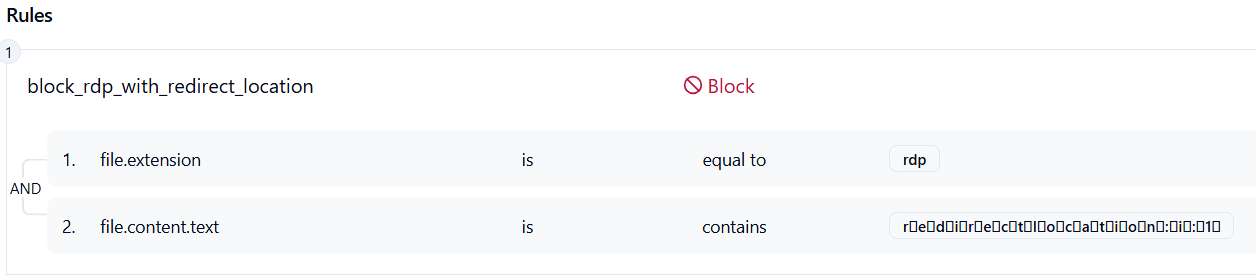
Follow These Steps
- Click on Launch Attack Simulation button
- With SQRX enabled, file will be blocked
Details
Midnight Blizzard threat actors weaponize malicious RDP configuration files (.rdp) to establish unauthorized connections to attacker-controlled servers. These files are crafted with redirect parameters that automatically expose the victim’s local resources — including drives, printers, clipboard, and authentication credentials — once executed. By leveraging legitimate Remote Desktop Protocol functionality and sometimes signed certificates, the attack blends into normal usage, bypassing traditional detection methods.
Unlike conventional malware droppers, these RDP files act as preconfigured backdoors, requiring minimal user interaction. When opened, they silently transmit session information and cached credentials to external servers, enabling attackers to stage data exfiltration, privilege escalation, and persistent footholds inside enterprise environments.
Impact
By exploiting native RDP functionality, the attackers bypassed traditional security controls. The bidirectional mappings allowed them to:
- Exfiltrate sensitive data and credentials.
- Install remote access trojans (RATs) in AutoStart folders for persistence beyond session termination.
- Move laterally into cloud environments.
In some cases, the attackers leveraged previously compromised legitimate email accounts, increasing the credibility of their emails and expanding the campaign’s reach.
Indicator of Compromise (IOC)
File Artifacts: Suspicious .rdp files containing redirectclipboard:i:1, redirectdrives:i:1, or hardcoded external hostnames.
Network Indicators: Outbound RDP traffic (3389/TCP) to non-corporate or geolocated IPs associated with known C2 infrastructure.
Process Behavior: Unusual invocation of mstsc.exe (Remote Desktop client) with preloaded config files from downloads/email.
Certificates: RDP sessions signed with unrecognized or newly issued digital certificates.