Block Google Drive Uploads Non Abizzcorp Users
Unauthorized Google Drive uploads from non-corporate accounts create data exfiltration risks where sensitive company information can be leaked to personal or attacker-controlled accounts.
Defend With SquareX
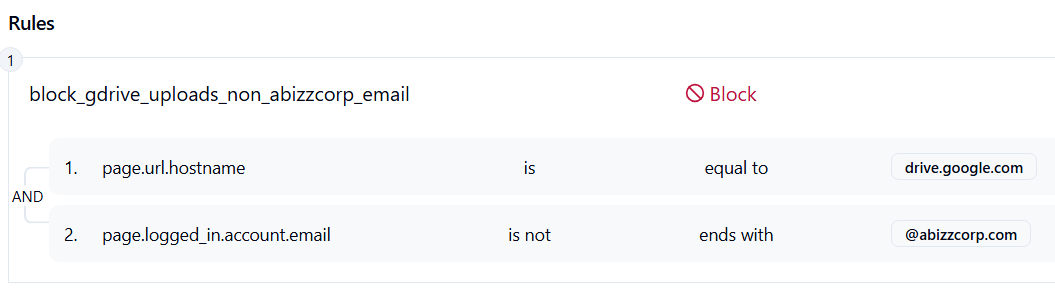
Create a file upload policy to Block Google Drive uploads for non-abizzcorp users.
Affected Companies:


Google
Waymo
Blogs:
Google Drive Deficiency Allows Attackers to Exfiltrate Workspace Data Without a Trace - DarkReading
Former Google, Uber Engineer Hit With Trade Secret Theft Charges - Digital Guardian
Metomic Finds 40% Of Google Drive Files Contain Sensitive Information, Putting Organizations At Risk Of A Data Breach - Metomic
Example Policy
Follow These Steps
- Click on Launch Attack Simulation button
- Try uploading a file
- If the users logged in account is not abizzcorp.com then the file uplaod will get blocked
Details
Blocking file uploads to Google Drive when users are not logged in with their corporate account prevents sensitive data from being stored in personal or unmonitored accounts. This measure ensures that files remain within the managed corporate environment, reducing the chance of accidental or intentional exfiltration to external storage.
Impact
Without this control, employees could upload confidential documents to personal or attacker-controlled Google Drive accounts, bypassing enterprise security policies. This creates risks of data leakage, regulatory non-compliance, and loss of visibility over where company information resides. By enforcing uploads only through corporate accounts, organizations maintain tighter control, reduce insider threat opportunities, and ensure sensitive files remain auditable and protected.