Block VPN Extensions
Malicious VPN browser extensions promise privacy but actually route traffic through attacker-controlled servers, exposing all browsing activity, credentials, and sensitive data. These fake VPN services conduct man-in-the-middle attacks while users believe they're protected.
Defend With SquareX
Create a browser extension policy to Block VPN extensions.
Affected Companies:



Google
Facebook
Bank Of America
Example Policy
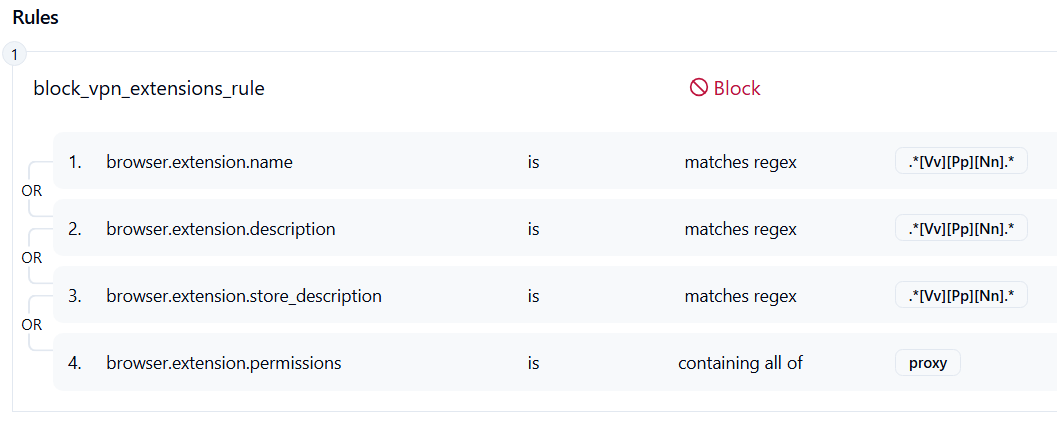
Follow These Steps
- Click on Launch Attack Simulation button
- Install the extension
- The extension will be blocked by Sqrx
Details
Threat actors distributed browser extensions disguised as “free VPNs” that secretly reroute user traffic through attacker-controlled servers. Once installed, these extensions intercept all web requests and perform man-in-the-middle (MitM) decryption, enabling attackers to harvest credentials, cookies, and sensitive information. Users believe they are gaining privacy, but in reality, their traffic is being exfiltrated in real time. The attackers push frequent updates to bypass detection by store scanners and enterprise security controls.
Impact
Hundreds of thousands of users have unknowingly exposed banking, social media, and corporate credentials. Stolen session cookies allow attackers to hijack active sessions, gaining unauthorized access to accounts and internal corporate tools. In many cases, these credentials enabled lateral movement inside corporate networks, leading to data breaches. Consequences include regulatory penalties, reputational damage, and costly incident response.
Indicator of Compromise (IOC)
Check for suspicious browser activity: malicious VPN extension IDs, outbound HTTPS traffic to unknown VPN endpoints controlled by attackers, and anomalous browser subprocesses injected with DLLs or JavaScript hooking into webRequest APIs. Watch for unrecognized TLS certificates (self-signed or obscure issuers) and persistent extension flags in enterprise dashboards showing installations prior to policy enforcement.