Block Malicious File Downloads
Malicious files identified through threat intelligence contain viruses, trojans, ransomware, or other malware that execute upon opening to compromise systems.
Defend With SquareX
Create a file download policy to Block malicious file downloads
Affected Companies:



Change Healthcare
Blue Yonder
Ticketmaster
Example Policy
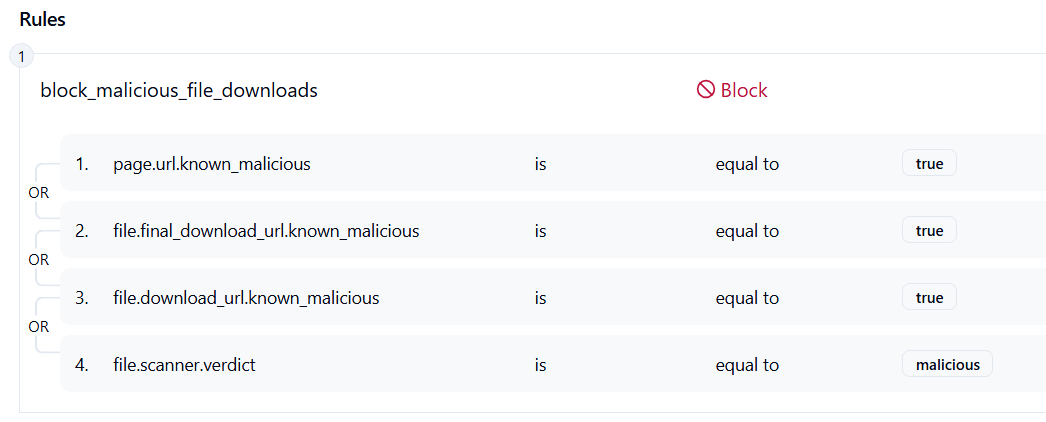
Follow These Steps
- Click on Launch Attack Simulation button
- With SQRX enabled, file download will get blocked
Details
Cybercriminals distribute malicious files through various channels including email attachments, compromised websites, file-sharing platforms, and social engineering campaigns to deliver viruses, trojans, ransomware, spyware, and other malware payloads. These files are continuously identified and catalogued through threat intelligence feeds from security vendors, malware analysis platforms, and cybersecurity organizations who maintain extensive databases of known malicious file hashes and signatures. Malicious files often masquerade as legitimate software including popular applications, system updates, productivity tools, and media files to trick users into execution. Common distribution methods include weaponized Office documents with embedded macros, executable files disguised as installers or patches, PDF files containing exploit code, compressed archives containing multiple malware components, and script files designed to download additional payloads. Attackers frequently use social engineering tactics to convince users to disable security warnings and execute malicious files despite browser and operating system protections.
Impact
System Compromise and Data Encryption: Ransomware files can encrypt entire file systems and network shares within minutes of execution, demanding payment for decryption keys.
Financial Theft and Banking Fraud: Banking trojans and credential stealers harvest sensitive financial information, login credentials, and payment data, enabling unauthorized transactions, identity theft, and large-scale financial fraud affecting millions of victims.
Corporate Network Infiltration: Malicious files executed on employee systems can establish persistent backdoors, enable lateral movement through corporate networks, and facilitate data exfiltration of intellectual property, customer databases, and confidential business information.
Indicator of Compromise (IOC)
File Hash Signatures: Known malicious file hashes identified through threat intelligence feeds including SHA-256, SHA-1, and MD5 signatures of confirmed malware samples, hash values of ransomware executables and trojans, signatures of weaponized Office documents and PDF exploits, hash patterns of cryptocurrency miners and remote access tools, and file fingerprints of state-sponsored malware and advanced persistent threat tools.
File Characteristics: Executable files with suspicious names mimicking legitimate software or system processes, documents with embedded macros that request permission to run external code, files with double extensions designed to hide true file types, compressed archives containing multiple suspicious executables or scripts, and files with unusual compilation timestamps or metadata indicating malicious modification.
Behavioral Indicators: Files that immediately attempt network connections upon execution, executables that modify system registry keys related to security software, files that create persistence mechanisms through scheduled tasks or startup entries and programs that attempt to disable antivirus software or system security features.