Block Clipboard Paste to ChatGPT
Pasting sensitive data—such as passwords, internal documents, customer information, or proprietary code—into ChatGPT poses a security and privacy risk.
Defend With SquareX
Create a clipboard paste policy to Block clipboard paste to ChatGPT.



Example Policy
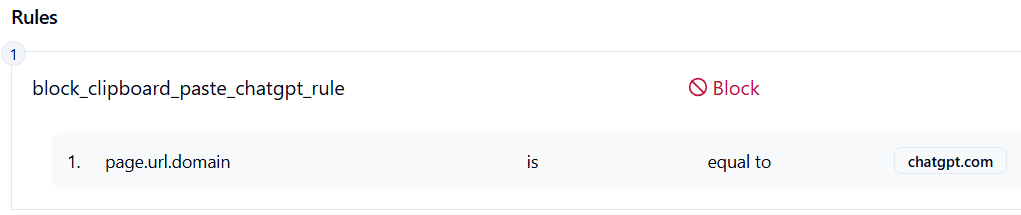
Follow These Steps
- Click on Launch Attack Simulation button
- Copy any text from your machine and try to paste into ChatGPT page
- With SQRX enabled, paste action will be blocked
Details
Users inadvertently expose sensitive organizational data by pasting confidential information from their clipboard into ChatGPT and other AI chat platforms during routine work activities. This security risk occurs through several common scenarios including employees copying passwords, API keys, database connection strings, or internal documents to assist with work tasks and accidentally pasting this content into AI chat interfaces and individuals seeking AI assistance with code, configurations, or documents without realizing they're sharing proprietary information with third-party services. Unlike traditional cyberattacks, this represents an insider threat through unintentional data leakage rather than malicious intent, making it particularly challenging to detect and prevent through conventional security controls.
Impact
Credential Exposure: Passwords, API keys, database connection strings, and authentication tokens become part of conversation logs with unclear retention policies.
Intellectual Property Loss: Proprietary source code, internal documents, business strategies, and competitive information may be inadvertently shared with third-party AI services.
Personal Data Breach: Customer information, employee records, financial data, and personally identifiable information (PII) could violate privacy regulations.